How to Choose a Fiber Cleaver
A cleaver does one job, and the whole splice depends on it: it scores and breaks the bare fiber so the end face is flat, clean, and close to a perfect right angle to the fiber axis. If that face is chipped, angled, or rough, the fusion splicer has to work with a bad starting point, and no alignment system can fully recover a poor cleave. Choosing a cleaver is therefore less about chasing a specification sheet and more about matching the tool to how your crews actually work — fusion splicing all day, occasional mechanical terminations, bench work, or fast FTTH drops in awkward spaces.
This guide walks through what actually differs between cleavers, what to check before you buy for a crew or for resale, and how to keep cleave quality consistent once the tool is in the field. Browse the full range in fiber cleavers as you read.
Start with the job: fusion splicing or mechanical termination?
The first split is the termination method.
For fusion splicing, cleave angle and end-face quality directly affect splice loss and the number of re-cleaves a technician has to make. A high-precision cleaver with a stable fiber holder, a repeatable scoring action, and an offcut collector is worth prioritising if splicing is the daily work. Models such as the K-10 high-precision fiber cleaver and the J20 high-precision fiber cleaver sit in this group: CNC production, aluminum alloy body, and a blade rated for 48,000 cleaves in the product data.
For cold connection and mechanical splicing — for example field connectors where speed matters and the connector design is more forgiving — an economy field cleaver can be the right, proportionate choice. The K-90 economy field fiber cleaver is described for exactly that use: cold connection and mechanical splicing.
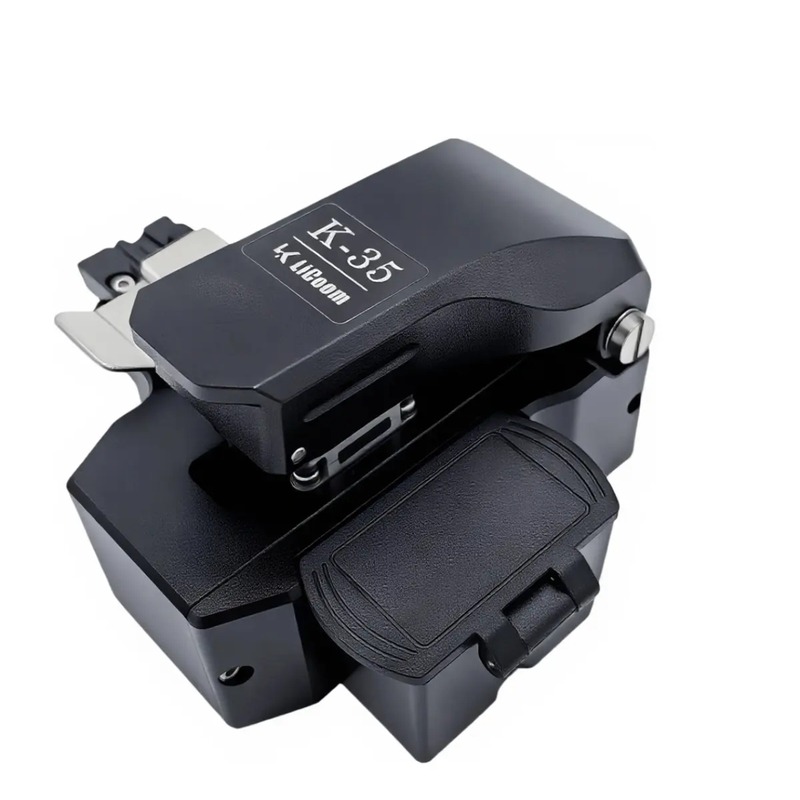
For FTTH drop work where the tool lives in a pouch and gets used on ladders, in cabinets, and at the customer wall box, handling and simplicity can matter more than the last fraction of precision. The K-07 molded FTTH fiber cleaver is a molded type made for FTTH field work, while the K-35 one-step fiber cleaver reduces the operation to one step with automatic rebound — fewer separate motions for the technician to get wrong when working quickly or in a tight space.
Decide this first. Buying a bench-grade precision tool for occasional mechanical work wastes budget, and buying the simplest field cleaver for all-day fusion splicing costs time in rework.
What "one-step" actually changes in the field
Traditional cleavers separate the steps: load and clamp the fiber, score it, then break it, then remove the offcut. One-step designs combine scoring and breaking into a single closing action. In practice that means:
- Fewer hand movements per cleave, which helps on repetitive FTTH work.
- Less variation between technicians, because there is less technique to vary.
- Offcuts are more consistently contained, which matters for safety — fiber shards should never be left on a work surface or floor.
One-step operation does not remove the need for correct fiber preparation. The fiber still has to be stripped cleanly, cleaned, and seated correctly in the holder at the right cleave length for your splicer or connector. If your crews struggle with consistency, watch a full prep cycle before blaming the cleaver: stripping damage and contamination cause as many bad cleaves as the cleaver itself.
Blade life, rotation, and replacement
The blade is a consumable, and its rated life only helps if crews use the whole blade. The K-35, K-10, and J20 are all listed with a blade life of 48,000 cleaves. That figure assumes the blade position is rotated as each position wears, and the blade height is kept in adjustment — a blade left on one spot will fail early at that spot while the rest of the edge is still good.
Before you buy, check three practical points:
- How is the blade position changed? If it needs workshop tools and a long procedure, it will not happen in the field. If it is a simple, documented rotation, crew leaders can schedule it.
- Are replacement blades available for that model? Keep fiber cleaver blades matched to your cleaver model in the kit or van stock. Tell your supplier the cleaver model so the right blade type is matched — blades are not universal.
- What are the symptoms of a worn position? Rising cleave angles, more frequent chips and hackles, and a splicer that suddenly needs more re-cleaves are the usual signs. Rotate first; replace when rotation no longer restores quality.
Build blade rotation into a routine — for example at a fixed cleave count or at the start of a new project — rather than waiting for splice quality to collapse mid-job.
Holders, cleave length, and fiber types
Check that the cleaver's fiber holder matches the fibers you work with: 250 µm coated fiber, 900 µm tight-buffered fiber, and drop-cable fiber presented in a holder are handled differently. Just as important is cleave length: fusion splicers and field connectors each expect the bare fiber to protrude by a set amount. A cleaver that cannot repeatably produce the length your splicer expects will create handling problems that look like splicer faults.
If your crews swap between a splicer and fast connectors on the same day, confirm the cleaver and any adapter holders support both workflows, and label holders clearly in the kit so the wrong one is not grabbed under time pressure.
Body, handling, and offcut control
Field cleavers get dropped, knocked, and used on uneven surfaces. An aluminum alloy body, as on the K-35, K-10, and J20, gives a rigid base that helps the scoring action stay consistent. Also check:
- Does it sit flat and stable on a cabinet shelf or splice tray table?
- Can it be operated comfortably with one hand positioning the fiber while the other closes the lid?
- Is there an offcut bin or collector, and is it easy to empty safely?
- Does the lid and clamp action feel positive, without play that could shift the fiber after clamping?
These details sound minor in a catalogue and matter a lot on the fiftieth cleave of the day.
Quick comparison
| Need | Look for | Examples |
|---|---|---|
| All-day fusion splicing | High-precision holder, stable body, long blade life | K-10, J20 |
| Fast, repetitive FTTH drops | One-step action, automatic rebound, simple handling | K-35 |
| FTTH field pouch tool | Molded, purpose-built field type | K-07 |
| Mechanical / cold connection | Economy field cleaver for that method | K-90 |
| Keeping any cleaver working | Correct replacement blade for the model | Fiber cleaver blades |
Pre-purchase checklist
- [ ] Termination method confirmed: fusion, mechanical, or both
- [ ] Cleave length matches your splicer / connector requirements
- [ ] Holders cover 250 µm, 900 µm, and drop fiber as needed
- [ ] Blade life, rotation method, and replacement blade availability confirmed
- [ ] Offcut collection included and easy to empty
- [ ] Tool fits the kit case and the way the crew works — pouch, bench, or tray
- [ ] A second cleaver or spare blade planned so work does not stop on a blade issue
Getting cleave quality right, day after day
The best cleaver choice is the one your crews can use consistently, maintain without a workshop visit, and keep fed with the correct blades. Pick by termination method first, then by handling and blade management, and treat stripping and cleaning as part of the same process — see fiber strippers by cable type for the prep step that comes before the cleave.
If you are equipping a crew, stocking a store, or specifying cleavers for a kit, send an inquiry via the contact form on this site or message us on WhatsApp at +86 150 6823 2998 with your splicer model, fiber types, and how your crews work. We will help you match a cleaver — and its spare blades — to the job.